K-pop Release Times Explained: KST, Local Dates and the DST Trap
A practical guide to reading official comeback clocks, with TWICE and ILLIT examples, five-city tables and an autumn daylight-saving check.

Your favourite artist posts a release time. You save the hour, send it to a friend and set an alarm. But are you following the same date, the same event and the same timezone? This guide breaks the process into a few checks you can reuse for a comeback, a premiere or an announced live. It combines official artist notices with original timezone tables and a calendar workflow. The artist examples are explicitly archival, so you can learn from them without mistaking this page for breaking release news.
At a glance
- The essential input
- Event date + clock + stated timezone.
- The local date matters
- A Seoul release can land on the previous evening in Los Angeles.
- An upcoming clock check
- UK clocks change October 25, 2026; US daylight saving ends November 1.
Try a KST timestamp
Convert a complete date and clock for five cities.
TWICE · THIS IS FOR (archival) · Official source ↗
| City | Local date | Time |
|---|---|---|
| Seoul | Jul 11, 2025 | 13:00 |
| New York | Jul 11, 2025 | 00:00 |
| Los Angeles | Jul 10, 2025 | 21:00 |
| London | Jul 11, 2025 | 05:00 |
| Tokyo | Jul 11, 2025 | 13:00 |
In this guide
Start with the event, not the countdown

A comeback notice can contain several clocks without describing the same event. A preorder opening, a digital release, a music-video premiere and a physical shipment may each have their own date. Before setting a reminder, write down exactly what you want to catch. “The album is out” is too vague if the notice is actually about an edition becoming available for preorder. The event label is part of the timestamp, not a decorative heading.
An archived TWICE announcement provides a useful worked example. JYP listed THIS IS FOR for July 11, 2025, at 1 p.m. KST and midnight ET. The official discography separately lists the album date as July 11. These are historical examples used to explain the method; this guide is not announcing a new TWICE release. The artwork reproduced here is the official album cover, not a photograph of a release-day event.
A dependable note therefore keeps the artist, title, event type, source date, source time and source timezone together. Keep the announcement URL alongside them. If you later find a corrected notice, you can compare the same event rather than accidentally replacing a release reminder with a live-stream reminder. A screenshot is convenient, but a source link lets you check surrounding text and updates that a cropped image may omit.
Also separate a page’s publication date from the event date inside its text. An announcement posted on Wednesday can describe a Friday release. A search result may show the Wednesday timestamp prominently, while the actual release information sits lower down the page. Read the event sentence before copying a date into your calendar.
One moment can belong to two different dates
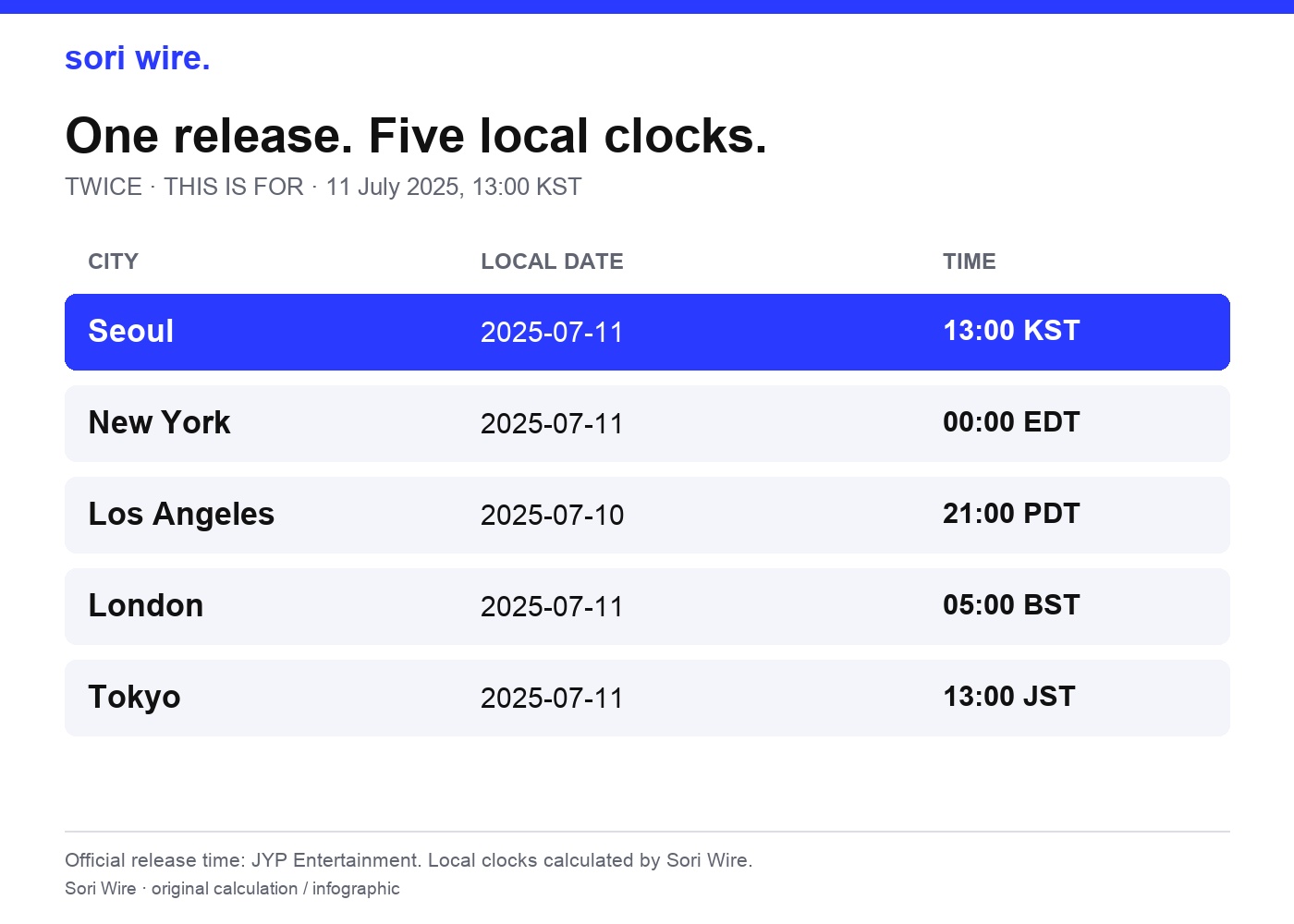
The most common practical mistake is converting the hour while leaving the Korean date unchanged. For a global audience, the date is just as important as the clock. In our TWICE example, 1 p.m. in Seoul on July 11 converts to midnight in New York on July 11, but to 9 p.m. in Los Angeles on July 10. Those fans are waiting for the same instant even though their calendars show different dates.
The five-city table below is our own calculation from the official timestamp. It uses named city timezones for the date of the release, rather than treating “America” or “Europe” as a single timezone. London reads 5 a.m. on July 11, while Tokyo reads 1 p.m. that day. The local labels matter too: New York is shown as EDT and Los Angeles as PDT for this July example. These labels describe the calculated local clocks, not additional release conditions announced by the artist.
A useful fan-facing update should include both the local time and the local date whenever a conversion crosses midnight. “9 p.m. Pacific” alone can leave someone wondering which evening to reserve. We recommend writing the full combination, such as Thursday, July 10, at 9 p.m. in Los Angeles, and keeping the original Korean timestamp underneath it. This also makes the information easier to check if a fan is travelling.
Think of conversion as moving one fixed event between clocks. It does not move the event itself or establish when a retailer will ship an item. Once you have the local result, compare its day and date with your source note. If the local date differs from Korea, make that difference visible in the reminder rather than relying on memory.
Read the chart as a table
| City | Local date | Local time |
|---|---|---|
| Seoul | 2025-07-11 | 13:00 KST |
| New York | 2025-07-11 | 00:00 EDT |
| Los Angeles | 2025-07-10 | 21:00 PDT |
| London | 2025-07-11 | 05:00 BST |
| Tokyo | 2025-07-11 | 13:00 JST |
A preorder opening is not the album-release clock
ILLIT’s official bomb (Merch ver.) notice makes this distinction concrete. It gives a preorder opening of June 9, 2025, at 11 a.m. KST and an album release of June 16 at 6 p.m. KST. A fan who copies the first timestamp they see will end up with a shopping reminder, not the release reminder they intended. Both entries can be useful, but they should be named separately.
Our comparison uses the stated 6 p.m. release timestamp as an archival example. On that June date it calculates to 5 a.m. in New York, 2 a.m. in Los Angeles, 10 a.m. in London and 6 p.m. in Tokyo. This is a second example of date-specific conversion, not a claim that every ILLIT release, album version or video follows this hour. Always return to the notice for the particular activity and version you are following.
The ILLIT group photograph included in this guide comes from BELIFT LAB’s official profile. It represents the artist; it is not presented as photography from this release or its preorder event. Keeping that distinction visible matters when a general reference guide combines an artist image with historical announcement examples. The picture helps orient the reader, while the notice and calculation establish the timing.
For your own calendar, make two entries if you care about both preorder access and the music release. Use names that will still make sense a week later: the artist, the item or activity, and whether the entry is an opening, a release or a deadline. Do not infer a delivery day from either of these entries. Shipping information needs its own explicitly stated terms.
Use the date you need, not a favourite fixed offset
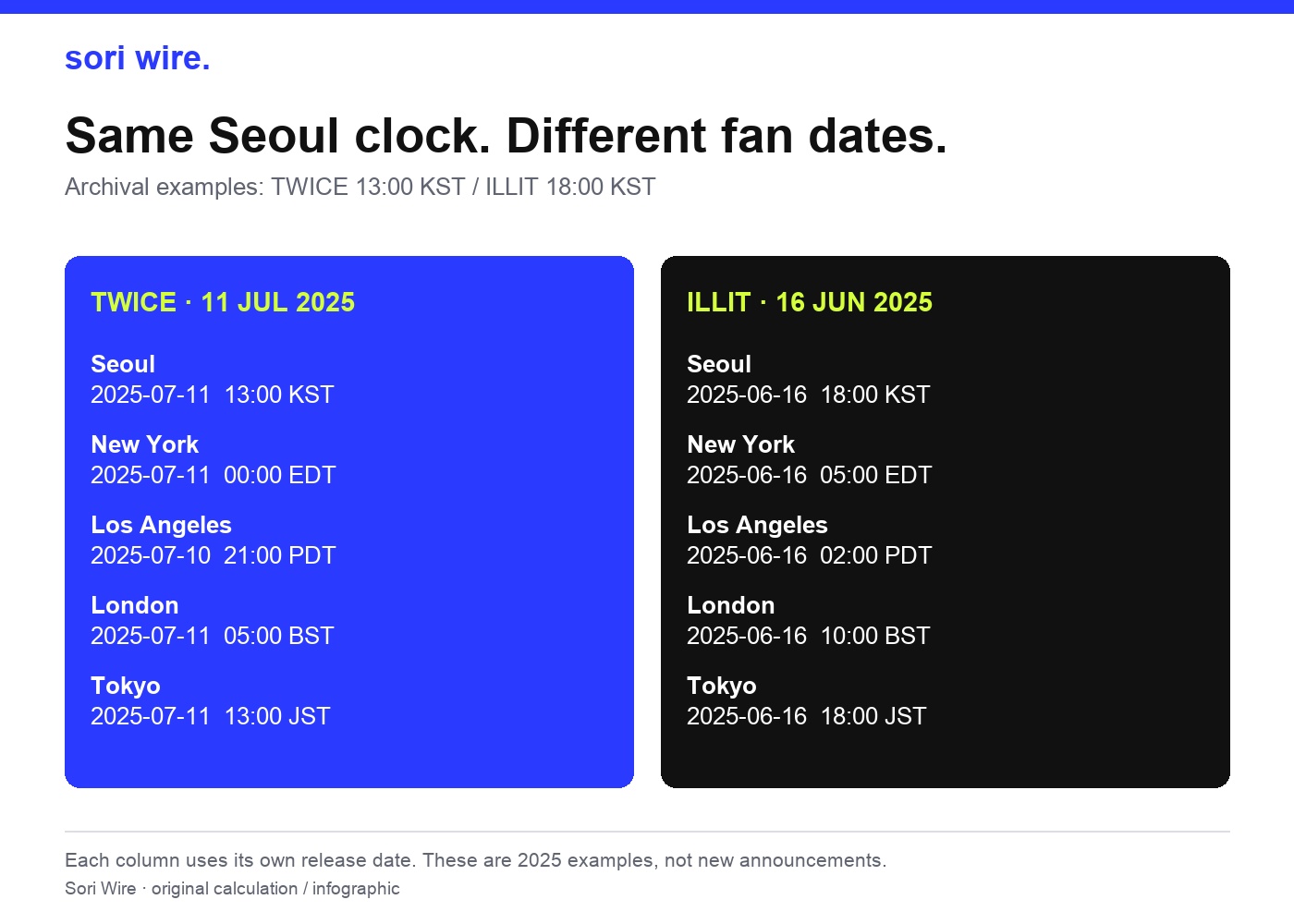
The side-by-side graphic shows why a fan’s saved shortcut can be misleading even when the source clock is correct. TWICE’s example starts at 1 p.m. KST in July; ILLIT’s starts at 6 p.m. KST in June. Each column is converted using its own full timestamp. You cannot use the New York hour from one column for the other merely because both announcements are Korean releases.
There is a second kind of shortcut to avoid: remembering one gap between Seoul and your city and assuming it works all year. Date-dependent rules can change that gap. A calendar or timezone calculator needs the release date as well as the hour. Entering only “13:00 Seoul” may default to today’s date, which is not necessarily the date you are checking. A correct-looking answer can still belong to the wrong season.
Choose your actual city, or an appropriate named timezone, instead of a vague regional label. ET is a broad convention that changes between standard and daylight time, while abbreviations such as CST can be ambiguous across different regions. If an announcement provides a clear KST timestamp, keeping Seoul as the source city removes one layer of guesswork. If it provides only an ambiguous abbreviation, check the original organiser’s context before converting it.
If two official pages disagree, pause the reminder and identify the event each page describes. They may concern different markets, formats or activities rather than conflicting clocks for one release. If the discrepancy remains unresolved, keep both source links and mark the time as unconfirmed. A conversion can make a timestamp easier to use; it cannot fix missing or conflicting announcement information.
Read the chart as a table
| City | TWICE · July 2025 | ILLIT · June 2025 |
|---|---|---|
| Seoul | 2025-07-11 13:00 KST | 2025-06-16 18:00 KST |
| New York | 2025-07-11 00:00 EDT | 2025-06-16 05:00 EDT |
| Los Angeles | 2025-07-10 21:00 PDT | 2025-06-16 02:00 PDT |
| London | 2025-07-11 05:00 BST | 2025-06-16 10:00 BST |
| Tokyo | 2025-07-11 13:00 JST | 2025-06-16 18:00 JST |
The autumn week when old shortcuts break
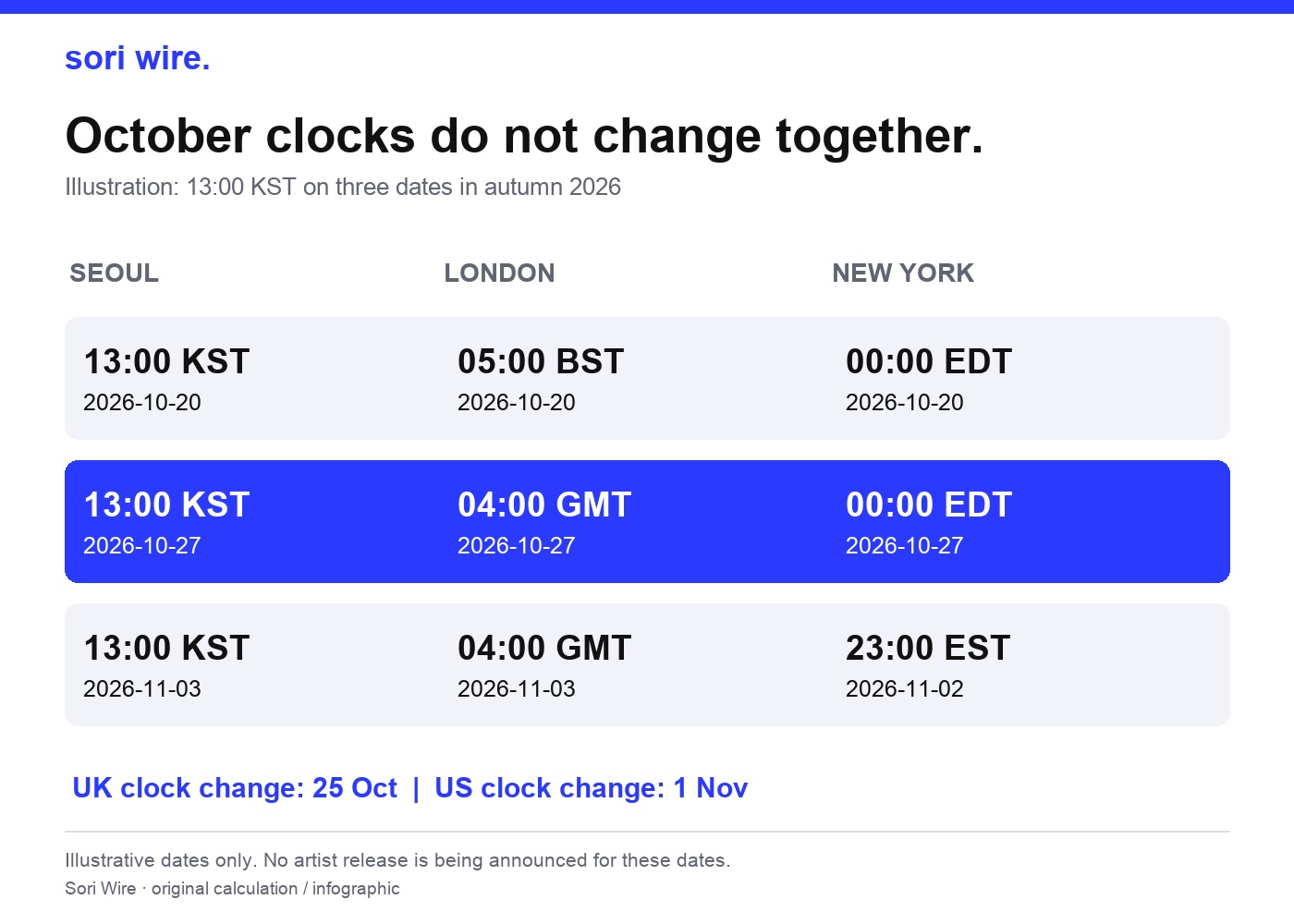
There is a particularly useful clock check coming up in autumn 2026. The United Kingdom returns to its standard clock on October 25, according to GOV.UK. NIST gives November 1 as the end of daylight saving time for the United States in 2026. These dates are a week apart. London and New York therefore do not make their seasonal change together.
Our graphic illustrates three hypothetical 1 p.m. Seoul timestamps: October 20, October 27 and November 3. These are calculation examples only; no artist release is being announced for those dates. The London result changes from 5 a.m. BST to 4 a.m. GMT between the first two rows. New York remains at midnight EDT in the middle row, then becomes 11 p.m. EST on the previous day in the final row.
This is why a timetable copied from an earlier comeback may look familiar but be one hour, or even one calendar date, away from the reminder you need. Check the release date inside the conversion tool each time. Pay extra attention to the week between different regions’ clock changes, because an offset that worked for one pair of cities last week may no longer work for the same pair today.
These examples concern London and New York specifically. Do not apply their seasonal changes to every country or every part of the United States. If you are following from another location, calculate that location directly. The practical habit is simple: preserve the artist’s complete timestamp, choose your own named location, and let the rules for that date determine the local clock.
A reminder that survives a busy comeback week
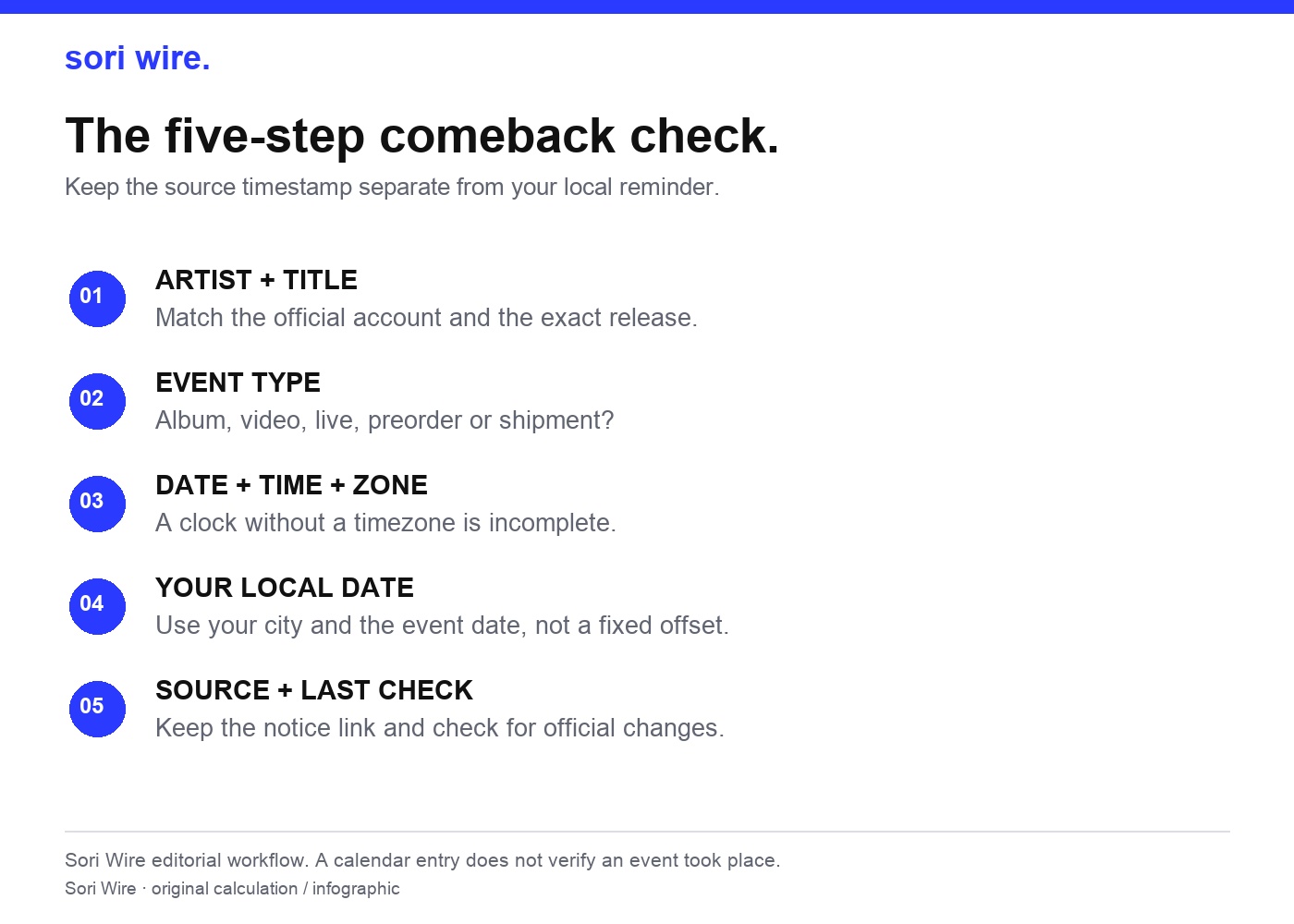
Once the time is verified, turn it into a reminder you can recognise quickly. We suggest a title that includes the artist, release or programme name, and event type. Add the official announcement link to the description, then keep a short note of the original date, clock and timezone. This makes it much easier to revisit the evidence if an account posts a later clarification.
When you enter the calendar time, choose one method consistently. You can enter the source timestamp with its source timezone, or enter the local timestamp you have already calculated with your local timezone. Avoid entering the converted local hour while leaving the event set to Seoul: that applies the conversion a second time. Inspect the final event display before saving it, including the calendar date.
If your calendar accepts an event timezone, use a named location appropriate to the source clock. If it only accepts your local clock, copy the complete calculated local date and hour. In either case, make one reminder for the actual event and, if helpful, a separate alert a little earlier. An early alert is your personal preparation choice, not a new release time reported by the artist.
Before a deadline or premiere you care about, reopen the saved official link and check whether the organiser has changed the announcement. Keep changes attached to the original event rather than creating duplicate reminders that appear to describe two releases. Recording a checked date helps you distinguish an old screenshot from a recently reviewed notice. It does not confirm that an event has happened; that is a different factual question.
Three questions to ask before sharing a countdown
Does “midnight” mean the beginning or the end of the date? In a clear 24-hour timestamp, 00:00 belongs to the start of the stated date. If an announcement uses less precise language, such as “Friday night” without a timezone, do not manufacture an exact timestamp. Ask for or look for the organiser’s fuller wording. Midnight screenshots are exactly where copying the clock without the date can cause avoidable confusion.
Should I change the Korean date to my date in a repost? Show both when possible. Start with the original timestamp, then label the local conversion with a city and local date. A fan update that keeps the two versions visible is easier to verify than one that silently replaces the Korean date. Avoid presenting an editorial conversion as a second official announcement from the artist.
Can a release clock tell me when everything will appear in my app? The notice establishes the announced activity and timestamp. It does not by itself document every service’s delivery, access conditions or availability in every market. If a particular service, stream or purchase matters to you, read that service’s relevant official information as well. Keep a specific access issue separate from the conversion: the same instant and the same availability conditions are different questions.
Keep the method when the comeback changes
The most useful thing to save from this guide is the method, not a memorised list of offsets. Start from the exact activity in a verified announcement. Preserve its date, hour and timezone. Convert that full timestamp for your own location. Check whether the local calendar date changes. Finally, make a reminder that carries its evidence with it.
Our two artist examples are historical, while the autumn 2026 diagram is an explicitly hypothetical comparison of clocks. They demonstrate a reusable way to read future notices without treating an old timetable as a new announcement. The charts are Sori Wire’s own calculations, generated with Python’s named-timezone conversion tools; the artist dates come from the linked official notices. The source list below lets you check each part separately.
If you share a table with a friend, include the event date and the original announcement link, not just a cropped row with an attractive hour. Someone reading it in another city, another month or another year should be able to see its limits immediately. That small amount of context turns a countdown into a reference people can use with confidence.
How this guide was made
Official artwork/profile photo and four original data/workflow graphics. Graphics use deterministic calculations; no generated artist images or invented measurements.
Artist release examples are archival. Illustrative clock-comparison dates are labelled as examples and do not announce an artist event.